Schedule and trigger agents
Some work should happen without anyone asking: the morning briefing at eight, the sales report every Monday, a review every time a pull request is opened. A routine is an agent that is started by something other than you — a schedule, a GitHub event or a call from another system. This guide shows how to set each one up, how to see what is coming and how to hold a routine.
There is nothing to create besides the agent: its Trigger decides what starts it. A scheduled or event-driven run is the same as any other run — same instructions, same tools, same approvals — and it shows up in History, on the agent's page and on the routine's Runs tab.
Prerequisites
- An agent with instructions — see Build an agent. Write them for a run nobody is watching: say where the result goes and what "done" means.
- For GitHub: admin rights on the repository, to add a webhook.
- For API calls: an API key from Settings → API keys (see Access Rational AI via API).
See your routines
Open Agents → Routines.
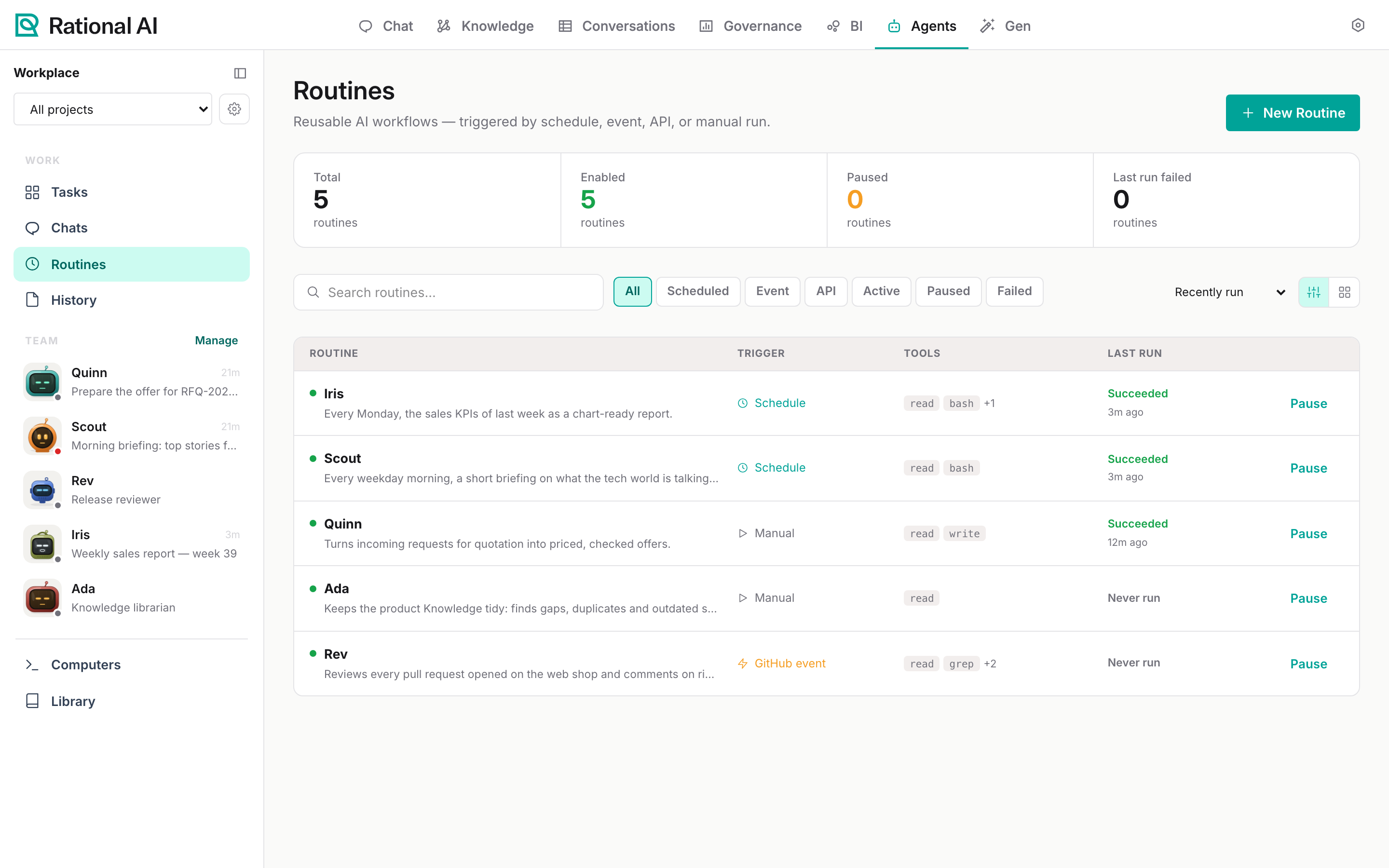
The counters at the top show how many routines there are, how many are enabled or paused and how many failed their last run. Every agent is listed with its trigger, its tools, the outcome of its last run and a Pause/Resume button. Search with Search routines…, filter by Scheduled, Event, API, Active, Paused or Failed, and sort by Recently run, Name, Status or Failing first; the two buttons on the right switch between list and grid.
Select a routine to open its panel: Run now starts it immediately, Edit opens the profile, and the Overview, Trigger, Permissions and Runs tabs show what it does, what starts it, what it may touch and how it went.
New Routine opens a new agent profile with the trigger already set to schedule.
Run it on a schedule
Scout writes the market briefing every weekday at 08:00, Rome time.
- Open the agent's profile (Edit), or create it with New Routine.
- Under Trigger & execution, set Trigger to
schedule. - Under Schedule, keep Cron and write the expression:
0 8 * * 1-5. - Set the Timezone, for example
Europe/Rome. Without one, the schedule follows the server's timezone. - Select Save profile.
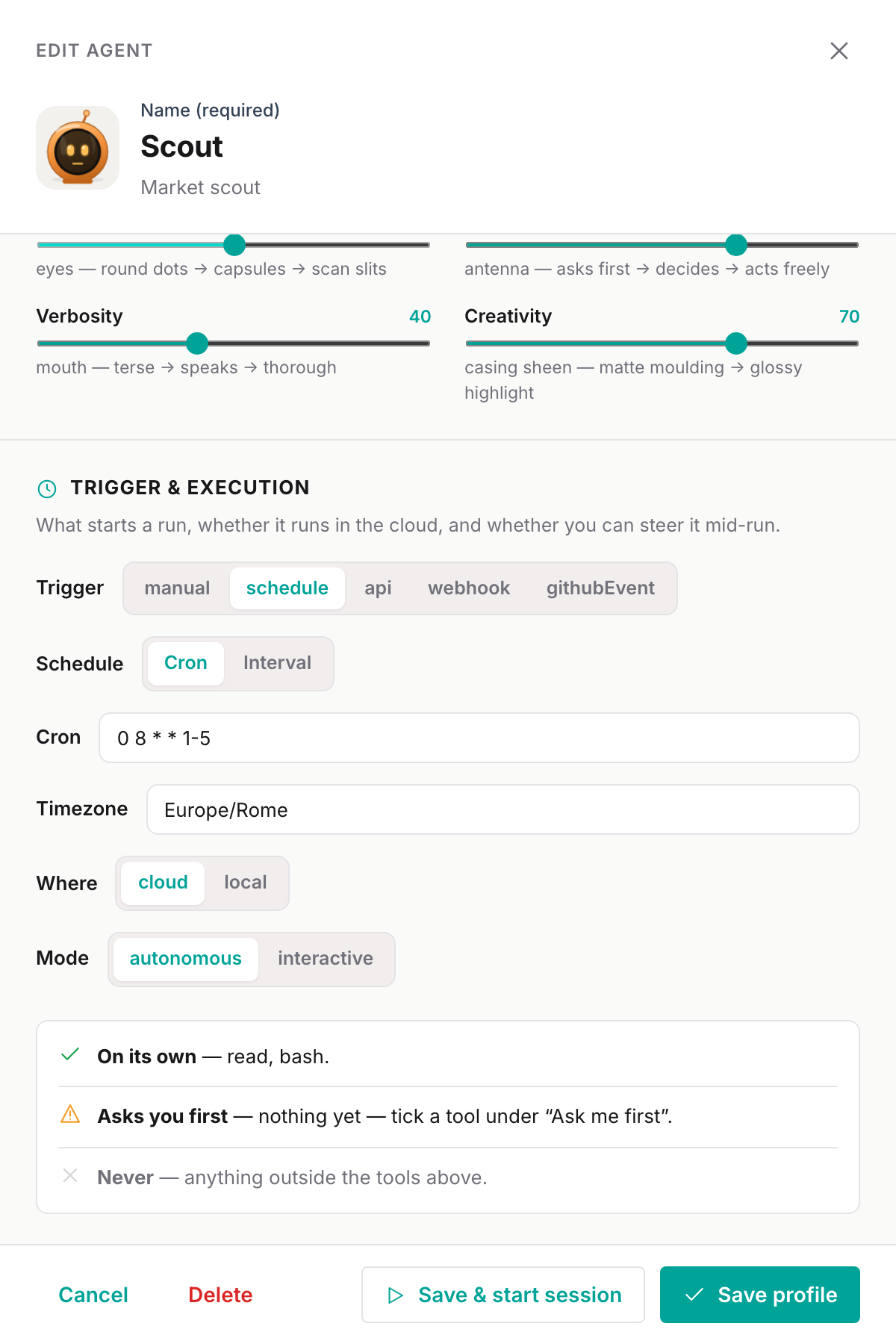
The cron expression has the usual five fields — minute, hour, day of the month, month, day of the week:
| Expression | Runs |
|---|---|
0 8 * * 1-5 | At 08:00, Monday to Friday |
0 7 * * 1 | At 07:00 every Monday |
*/30 8-18 * * 1-5 | Every 30 minutes from 08:00 to 18:30, on weekdays |
0 6 1 * * | At 06:00 on the first day of every month |
If a scheduled run is due while the previous one is still going, it is skipped rather than stacked. When the agent has no model of its own, the platform Agents default is picked when the run starts.
The Interval option (Every n minutes) does not create a schedule yet, and saving a profile with it removes the cron schedule the agent had. For a regular interval, write it as a cron expression, such as */15 * * * * for every 15 minutes.
See what's coming in the calendar
Calendar, the third view on the Tasks page, lays the scheduled runs of the next seven days on a week grid from 07:00 to 21:00, next to today's runs and approvals.
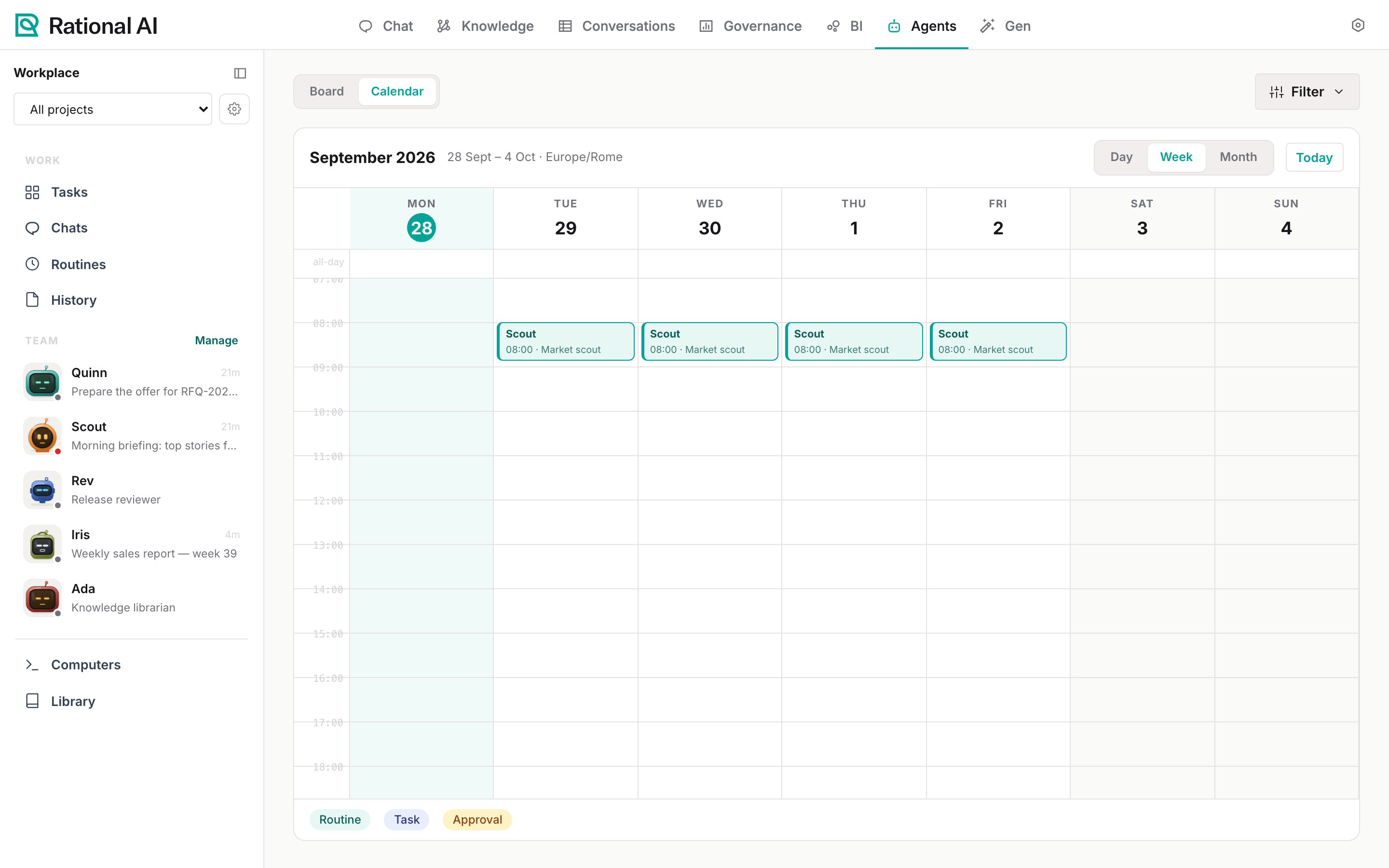
Filter narrows it to recurring or one-time routines and to active or paused ones; paused routines show as <name> · paused in the all-day row. The legend at the bottom tells routines, tasks and approvals apart.
Run it on a GitHub event
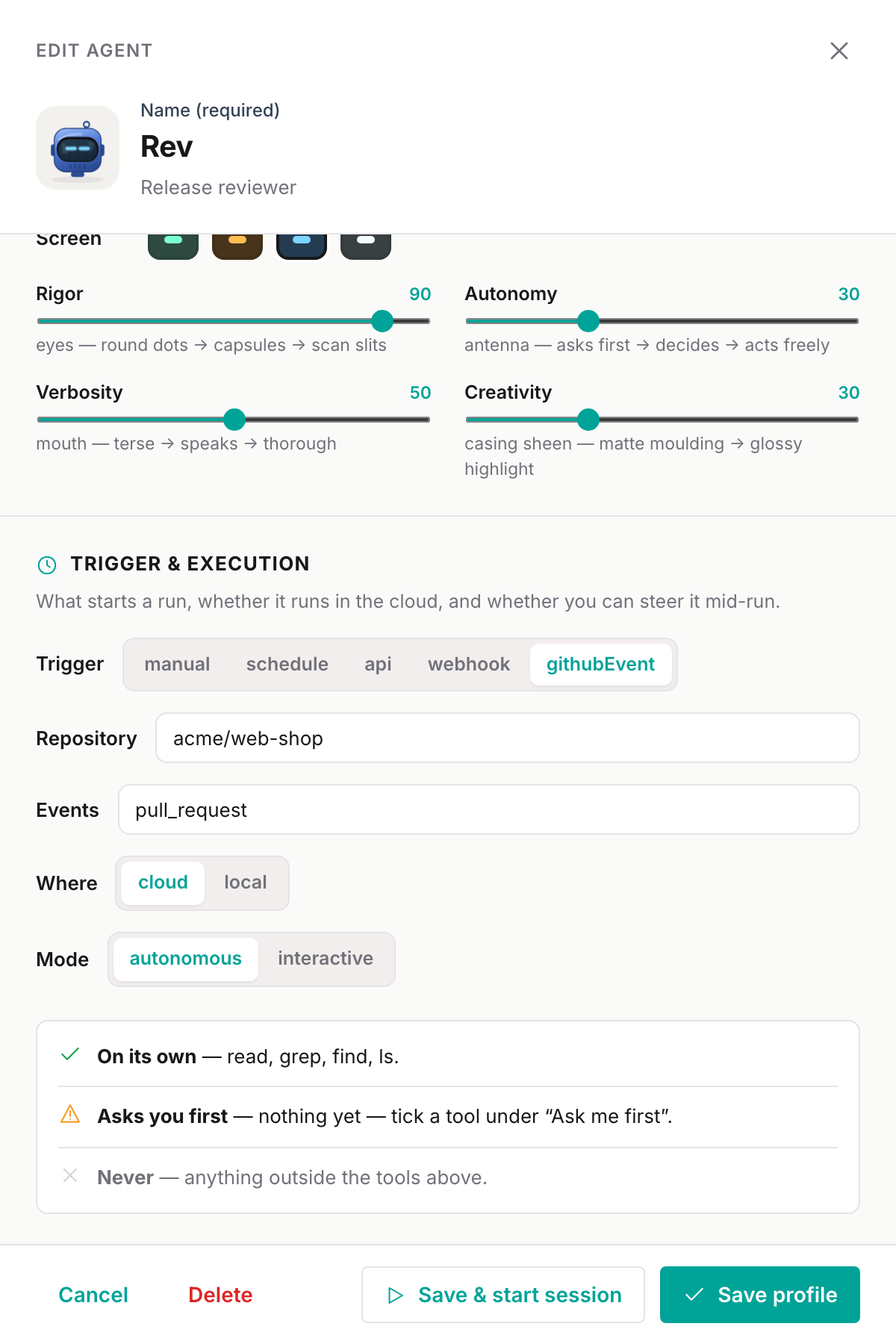
Rev reviews every pull request opened on acme/web-shop. GitHub calls Rational AI with a signed webhook, and each delivery starts a run whose input is the event payload.
Configure the agent
- In the profile, set Trigger to
githubEvent. - Repository:
organisation/repository, for exampleacme/web-shop. - Events: a comma-separated list of GitHub event names, for example
pull_requestorpull_request, push. Leave it empty to accept every event. - Select Save profile.
Generate the webhook secret
The secret is what proves a delivery came from your repository. It is generated through the API, with an API key and the agent's ID (the last part of the agent's page address, /agents/team/<agent id>):
curl -X POST "https://<your address>/api/agents/v0/agents/<agent id>/webhook-secret" \
  -H "Authorization: Bearer $RATIONAL_AI_API_KEY"
The answer is {"secret":"…"}. It is shown only this once: store it for the next step. Calling the endpoint again replaces the secret, and GitHub deliveries signed with the old one are refused.
Add the webhook on GitHub
In the repository, go to Settings → Webhooks → Add webhook and fill in:
| Field | Value |
|---|---|
| Payload URL | https://<your address>/api/agents/v0/webhooks/<tenant>/<agent id>/github |
| Content type | application/json |
| Secret | the secret from the previous step |
| Which events | the events you listed on the agent |
<tenant> is your organisation's identifier on the platform, normally the first part of your Control Room address (<tenant>.…); your administrator can confirm it.
GitHub sends a ping as soon as the webhook is saved; the answer {"status":"pong"} in Recent Deliveries confirms that the address and the secret are right. From then on, every matching event answers {"status":"queued","runId":"…"} and a run appears in History with trigger githubEvent.
| GitHub shows | Means |
|---|---|
401 | Wrong agent ID, or the signature does not match the secret. Regenerate the secret and paste it again. |
{"status":"ignored","reason":"paused"} | The agent is paused. |
{"status":"ignored","eventName":"…"} | The event is not in the agent's Events list. |
{"status":"duplicate"} | GitHub redelivered an event that already started a run. |
Deliveries are accepted from any repository that has the webhook URL and the secret; the Repository on the profile tells the agent where the events come from but does not reject other repositories. Keep the secret on the repositories you mean.
Start it from another system
Any system that can make an HTTP request — a CRM, a ticketing tool, a nightly script — can hand work to an agent:
curl -X POST "https://<your address>/api/agents/v0/agents/<agent id>/execute" \
  -H "Authorization: Bearer $RATIONAL_AI_API_KEY" \
  -H "Content-Type: application/json" \
  -d '{
        "task": "Prepare the offer for RFQ-2026-0161 (Kessler Agritech)",
        "instructions": "Three lines of M12 hex bolts, zinc flake. Price them and write the offer file.",
        "input": { "rfq": "RFQ-2026-0161", "customer": "Kessler Agritech" }
      }'
task— the one-line goal of the run, shown in History.instructions— optional details for this run; the profile's instructions still apply.input— optional JSON the agent receives as-is.
The answer is the new run, with its id and status; follow it at /agents/runs/<run id>. The key acts as an administrator; add an X-USER-ID: <user id> header to act as a specific user, with that user's permissions. Setting the agent's trigger to api marks it as API-driven in Routines; an agent with any trigger can be started this way.
Pause an agent
Pause (on the agent's page or its row in Routines) marks the agent as Paused: its card and routine row say so, GitHub deliveries are ignored, and its upcoming runs leave the calendar. Resume clears it.
Pausing does not remove the cron schedule itself. To be sure a scheduled agent stops running, set its Trigger back to manual and save; set it to schedule again when you want it back.