Back up and restore an on-premise installation
An on-premise Rational AI installation keeps its data in several places: a PostgreSQL database, a vector store, an object storage, the installed extensions and the knowledge databases. Settings → Backup copies all of them, in one run, to a destination you own — a network share, an S3 bucket, an FTP or SFTP server, or a mounted folder — on a daily schedule or on demand. This guide covers what a backup contains, how to set the destination up, how to check that backups are really happening, and the offline procedure that brings an installation back from one.
The Backup page exists only where the installation is configured for it (Backup__Enabled=true on the backend, see Prerequisites). On the managed cloud the platform backs the data up for you and the page is not shown.
What a backup contains
| Component | What is captured | How |
|---|---|---|
| postgres | Every database on the server: the application data of every tenant, the workflow engine, the identity provider. This is also where the key ring that protects stored credentials lives, so a backup is sensitive material — keep the destination as private as the installation itself. | One pg_dump per database plus the roles, streamed to the destination |
| qdrant | The vector collections (embeddings behind knowledge retrieval) | One snapshot per collection, streamed to the destination and removed from the vector store afterwards |
| storage | The object storage: attachments, synced source files, extension packages | An incremental mirror in the storage/ folder of the destination, shared by every backup |
| extensions | The installed extensions directory | A tar.gz per backup |
| sqld | The knowledge databases (Rational BI, SQLite resources) | A tar.gz per backup |
Each run produces a folder named after its UTC start time (2026-09-09T02-30-00Z) with a manifest.json describing what it holds. The object-storage mirror is never pruned: files deleted from the application stay in the mirror, so every dump — old or new — finds the attachments it references. Retention only removes whole backup folders.
Downloaded models (Ollama, Hugging Face), the audio model cache and the Python package caches are not part of a backup: they are re-downloaded on demand after a restore. The session cache is not backed up either; after a restore everyone signs in again.
Prerequisites
Before you start, make sure you have:
-
Administrative access. The page is admin-gated.
-
Backup enabled on the installation. The backend needs
Backup__Enabled=true, and the worker that performs the backup (temporal-worker) needs to know where the live data is:Variable Value on a Compose installation BACKUP_POSTGRES_URLpostgresql://postgres:<password>@db:5432/postgresBACKUP_QDRANT_URLhttp://vectordb:6333(plusBACKUP_QDRANT_API_KEYif one is set)BACKUP_EXTENSIONS_PATHThe extensions directory, mounted into the worker (for example ./data/extensions:/rationalai/backend/extensions)BACKUP_SQLD_PATHThe libsql data directory, mounted into the worker (for example ./data/sqld:/backup/sqld)The object storage needs nothing extra: the worker already reaches it as its
dest:rclone remote. A component whose variable is missing is reported as skipped, not as a failure. -
A destination with enough space for the database dumps, the vector snapshots and a full copy of the object storage. The worker itself needs no free disk: everything is streamed.
Set the destination
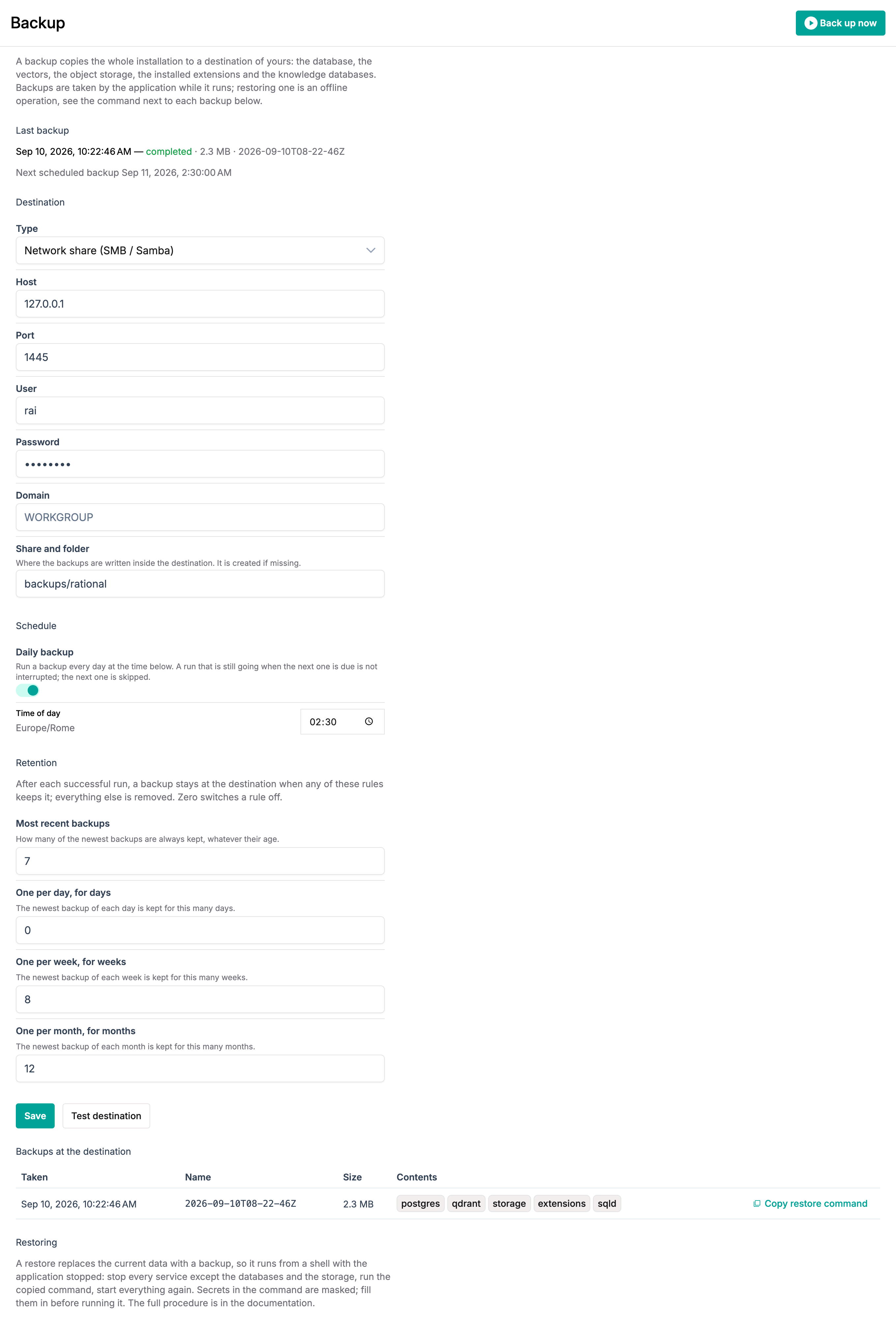
Go to Settings → Backup and pick the destination Type. The fields change with the type:
| Type | Fields | Path |
|---|---|---|
| Network share (SMB / Samba) | Host, port (445), user, password, domain | Share and folder, e.g. backups/rational |
| S3 bucket | Endpoint, provider (Other for a NAS or MinIO, AWS for Amazon), region, access key ID, secret access key | Bucket and prefix, e.g. my-bucket/rational |
| FTP server | Host, port (21), user, password | Folder |
| SFTP server | Host, port (22), user, password | Folder |
| Local folder (NFS mount) | — | The absolute path of a folder the worker can see, typically an NFS mount added to the worker container |
The folder is created on first use. Click Test destination before saving: the worker writes and deletes a small marker file there, which proves the credentials, the path and the write permission in one go. A failure comes back with the reason (a wrong password, a read-only share, an unreachable host).
Plain FTP sends the password and the data in clear and cannot verify what it wrote. It is supported for legacy targets; when the same server offers SFTP, use that.
Passwords and access keys are stored encrypted. When you come back to the page they show as ********; leave them as they are to keep the stored value, or type a new one to replace it.
Schedule
Daily backup runs a backup every day at the Time of day shown, in the time zone of your browser at the moment you save. A run that is still going when the next one is due is not interrupted; the next one is skipped.
Retention
After each successful run the destination is pruned. A backup stays when any rule keeps it; everything else is removed. Zero switches a rule off, and at least one rule must be set.
| Rule | Keeps |
|---|---|
| Most recent backups | The newest N backups, whatever their age |
| One per day, for days | The newest backup of each day, for the last N days |
| One per week, for weeks | The newest backup of each week, for the last N weeks |
| One per month, for months | The newest backup of each month, for the last N months |
A typical policy is 7 most recent, one per week for 8 weeks, one per month for 12 months: a week of daily restore points, two months of weekly ones, a year of monthly ones — roughly 27 backups at the destination instead of 365. Only the dumps and snapshots are pruned; the object-storage mirror is shared by every backup and is never removed.
Click Save. The Next scheduled backup line under Last backup confirms the schedule is registered.
Back up now, and check it happened
Back up now starts a backup immediately. While it runs the page shows each component as it is captured; when it finishes, Last backup shows the time, the outcome, the size and the folder name, and the backup appears under Backups at the destination.
A failed run reports the error in place of the size. A backup that fails half-way is removed from the destination, so whatever is listed there is complete and restorable.
Two things are worth checking now and then:
- Last backup keeps moving and says completed. A schedule nobody watches is a schedule that can silently stop.
- The list under Backups at the destination is what the destination actually holds, read from it each time the page loads — not a log kept by the application. If the destination disappears, so does the list.
Restore
Restoring replaces the current data with a backup, which is why it is not a button: the application must be stopped while its databases are dropped and recreated. It runs from a shell on the host, with the same worker image, using the command the page gives you.
Every database, the vectors, the object storage, the extensions and the knowledge databases are replaced by the backup's contents. Anything created after that backup was taken is lost. Take a fresh backup first if there is any doubt.
-
In Backups at the destination, click Copy restore command on the backup you want. The command carries the destination settings as environment variables; the secrets are masked as
********— replace them with the real values. -
On the host, stop every application service but keep the data services running:
docker compose stop backend fastapi-proxy temporal-worker temporal keycloak webserverdb,vectordb,s3andsqldstay up: the restore writes into them. -
Run the copied command. It looks like this:
docker compose run --rm --no-deps \
  -e RCLONE_CONFIG_BACKUP_TYPE=smb \
  -e RCLONE_CONFIG_BACKUP_HOST='nas.example.com' \
  -e RCLONE_CONFIG_BACKUP_USER='backup' \
  -e RCLONE_CONFIG_BACKUP_PASS='<the password>' \
  -e BACKUP_ROOT='backup:backups/rational' \
  temporal-worker rational-backup restore 2026-09-09T02-30-00Z
It asks for confirmation, then restores the roles and databases, syncs the object storage back, uploads the vector snapshots and unpacks the extensions and the knowledge databases, printing one line per step. Add
--yesto skip the confirmation,--only postgres,qdrantto restore a subset. -
Start everything again:
docker compose up -d -
Sign in and check a recent conversation, a knowledge base and an extension. Extensions may take a moment on first use while their packages are re-downloaded.
A few consequences to know about:
- The database superuser password is not changed by the restore, even though the backup carries the old one, so the
.envthat drives your Compose stack keeps working. - Everyone is signed out: sessions are not part of a backup.
- The backup includes the workflow engine's state. A backup run that was in progress when that backup was taken may resume and complete after the restore; it is harmless.
- Restore into the same version of Rational AI that took the backup, or a newer one: the application migrates the database forward on start, never backwards.
Rehearse it
A backup that has never been restored is a hope, not a plan. The same command restores into a spare installation — a second Compose stack on another host, or the same one with fresh volumes — without touching production. Doing this once after setting the destination up, and again after upgrades, is the only way to know the destination is really usable.
The worker also offers rational-backup list, show <name> and probe with the same environment variables, for scripts and for checking a destination from the shell.
Troubleshooting
| Symptom | Likely cause |
|---|---|
| Test destination fails with permission denied | The share or folder is read-only for the given user. |
| The status shows failed with pg_dump: server version mismatch | The worker image is older than the database server; update the worker. |
| A component is skipped | Its BACKUP_* variable is not set on the worker, or the path it points at does not exist there. |
| The backups list is empty though runs completed | The destination path was changed after those runs: the list reads the current path. |
| The restore stops at database … restored with is being accessed by other users | An application service is still connected. Stop it and run the command again. |