Reach an on-premise installation through the Rational AI Tunnel
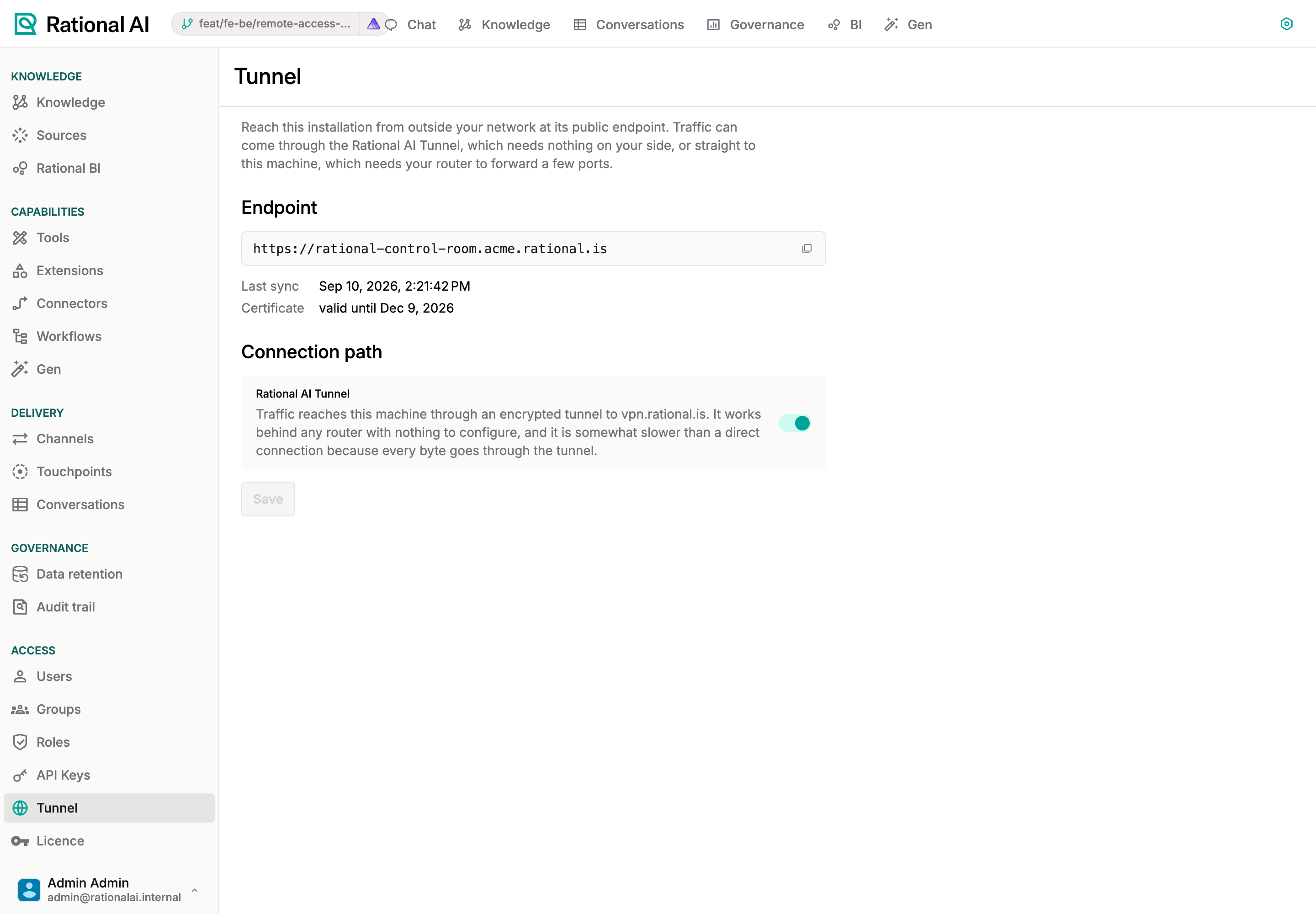
An on-premise Rational AI installation runs on a machine inside your network: a DGX Spark in the server room, a workstation under a desk. Out of the box it is reachable only from that network. Settings → Tunnel gives it a public endpoint under rational.is — https://rational-control-room.<yourcompany>.rational.is — with a browser-trusted certificate, and lets you choose how the traffic gets there: through the Rational AI Tunnel, which works behind any router with nothing to configure, or directly, which is faster and needs a couple of port-forwarding rules on your router.
The Tunnel page exists only on installations that were provisioned with a Rational AI hub connection. On the managed cloud the platform handles addresses and certificates for you and the page is not shown.
How it works
| Piece | What it does |
|---|---|
| Endpoint | Your installation is named <yourcompany>.rational.is; the application answers at rational-control-room.<yourcompany>.rational.is. Rational AI manages the DNS records. |
| Certificate | Issued by Rational AI for the name and its subdomains (Let's Encrypt, renewed automatically). Browsers trust it out of the box: nothing to install on any client. |
| Tunnel | With the tunnel on, your endpoint points at vpn.rational.is, which forwards each connection, still encrypted, through a private WireGuard tunnel to your machine. Rational AI only reads the name the browser asked for; it never sees the content. |
| Direct | With the tunnel off, your endpoint points at your public IP and your router forwards the ports below to the machine. |
| Licence | The licence of the installation is delivered and renewed through the same channel; its status is on Settings → Licence. |
The machine checks in with Rational AI once a minute. That is when a switch you flip takes effect, a renewed certificate is installed, and a changed public IP is followed.
Prerequisites
- Administrative access. The page is admin-gated.
- An installation connected to the hub. The provisioning command from the platform console connects it (see Provision the machine); an installation set up with a domain of your own does not show the page.
- Outbound internet access from the machine to
control-room.rational.is(HTTPS) and, for the tunnel, tovpn.rational.ison UDP port 51820. No inbound rule is needed for the tunnel.
Choose the connection path
Open Settings → Tunnel. The Endpoint section shows the installation's public endpoint with a copy button, the time of the last check-in and the certificate's expiry.
Rational AI Tunnel (the default)
Leave Rational AI Tunnel on and press Save if you changed anything. Within a minute the endpoint resolves to vpn.rational.is and the installation is reachable from anywhere.
Choose the tunnel when:
- you cannot, or would rather not, change the router's configuration;
- the machine sits behind a carrier-grade NAT, a 4G/5G router or a network you do not control;
- you want it working now and can tune later.
The cost is latency: every byte makes a round trip through the tunnel, so pages and generations feel somewhat slower than on the local network. Users on the local network are not affected in either mode: the application is always reachable at the same endpoint from inside too.
Direct connection
Switch Rational AI Tunnel off. The page shows a Configure your router box with the rules to add:
| External port | Protocol | Forward to |
|---|---|---|
| 443 | TCP | <the machine's LAN address>:443 |
| 80 | TCP | <the machine's LAN address>:80 |
The LAN address of the machine and your current public IP are listed underneath. Add the two rules on your router (the feature is usually called port forwarding, NAT or virtual server), then press Save. Within a minute the endpoint resolves to your public IP; if your provider changes it, the installation notices at the next check-in and the endpoint follows.
If your provider puts you behind a shared address (carrier-grade NAT, common on mobile and some fibre connections), forwarded ports never reach you and the installation becomes unreachable from outside as soon as the tunnel is off. If in doubt, keep the tunnel on, or ask your provider for a public IP first. Switching the tunnel back on restores access within a minute.
Port 80 only redirects browsers to HTTPS; forwarding it is convenient, not required.
Provision the machine
The installation is connected to the hub when it is provisioned. On the platform console (admin.rational.is) an operator creates the customer's licence and presses Activation code on it; the code is redeemed by the installation (at provisioning, or later on Settings → Licence), which registers it on the platform. The operator then sets the installation's subdomain on its page. From a laptop with SSH access to the machine (the scripts live in deploy/onprem of the Rational AI repository):
./provision.sh --host rational@192.168.1.20 --tag v1.15.0 \
  --hub https://control-room.rational.is --code RAI-XXXXX-XXXXX-XXXXX-XXXXX
It installs or reconfigures the whole stack: it fetches the platform's public key, starts the services, activates the licence, and installs the minute check-in that brings the endpoint, the certificate and the tunnel once the subdomain is set. Re-running it later is safe; it converges the machine on the requested release and keeps everything else. See Licence and activation for what the code does and for machines without internet access.
Check that it works
- From outside your network (a phone off Wi-Fi is the quickest test), open the endpoint shown on the page. The login page should load with a valid certificate — no warning.
- On the page, Last sync should be within the last minute or two. An older time means the machine cannot reach
control-room.rational.is: check its internet access. - Certificate should read valid until a date a few weeks or months ahead. Not issued yet right after provisioning is normal; it appears within a couple of minutes.
- On the machine,
sudo rational statusprints the current path (tunnel on, or direct on your public IP) andsudo rational syncruns the check-in immediately, printing what it applied.
Troubleshooting
| Symptom | What to check |
|---|---|
| The endpoint does not resolve, or resolves to an old IP | DNS changes take up to a minute to apply and a few more to propagate to your resolver. The page's Last sync confirms the installation reported the change. |
| Reachable on the local network, not from outside, tunnel on | The tunnel needs UDP 51820 out to vpn.rational.is. A firewall that blocks it keeps the traffic from reaching the machine. |
| Reachable on the local network, not from outside, tunnel off | The router rules (443 and 80, TCP, to the LAN address shown) and the public IP: see the caution above about shared addresses. |
| Certificate warning in the browser | The certificate has not been issued yet, or the machine has not checked in since it was renewed. Wait a couple of minutes; sudo rational sync forces it. |
| The endpoint never appears, Last sync stays never | The installation has no identity on the platform yet: activate the licence (Settings → Licence), then wait a minute; and check that the operator set the subdomain on the platform console. |