Activate the licence of an on-premise installation
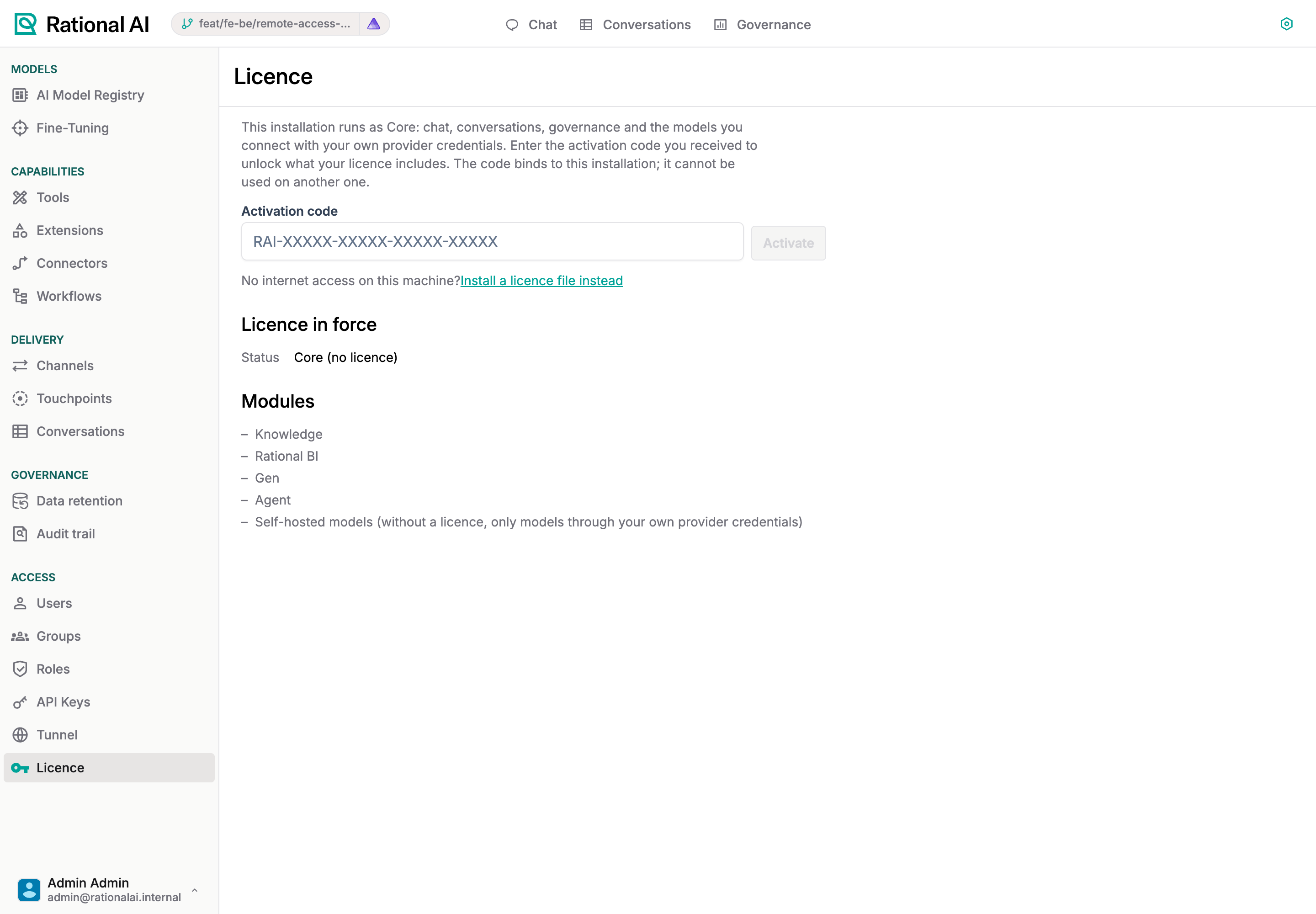
A freshly installed Rational AI is not activated: chat, conversations, governance, the settings that go with them, and any model you connect with your own provider credentials. Activating a licence brings the essential models Rational AI hosts and the modules your plan includes (Knowledge, Rational BI, Agents, Gen); self-hosted models on your own GPU come with the enterprise plan. The licence is installed from Settings → Licence, with an activation code or, on a machine without internet access, with a licence file; both are issued by Rational AI for your contract.
The Licence page is shown where the installation expects a licence, that is on on-premise installations. On the managed cloud your plan is applied by the platform and the page is not shown.
How it works
| Piece | What it does |
|---|---|
| Activation code | A product key (RAI-XXXXX-XXXXX-XXXXX-XXXXX) issued by Rational AI for your licence. It is redeemed once: the first installation that uses it is bound to it, and no other installation can use it afterwards. |
| Licence | A signed document that says what your contract includes: the modules, the number of seats, self-hosted models, the validity. Signed by Rational AI, verified by the installation; it cannot be altered. |
| Refresh | When Rational AI changes your licence (a module added, an extension), press Refresh licence on the page: the installation fetches the current one. Nothing else to do. |
| Grace | When a licence expires, everything keeps working for seven days; past them the installation is not activated again, without losing anything. A trial ends the day it ends. |
Activate with a code
- Sign in as an administrator and open Settings → Licence. On an installation that is not activated the page asks for the code.
- Enter the code you received and press Activate. Spaces, dashes and case do not matter.
- The page shows the licence in force: who it is licensed to, the plan, the seats, the validity and the modules it includes. The navigation gains the unlocked modules at once.
The machine needs outbound HTTPS access to control-room.rational.is for this step. From the machine's shell the same activation is sudo rational activate RAI-XXXXX-XXXXX-XXXXX-XXXXX, useful in a provisioning script (see Provision the machine).
Install a licence file (no internet access)
On a machine that cannot reach the internet, Rational AI issues the licence as a file instead. On Settings → Licence choose Install a licence file instead, paste the file's content and press Install licence file. The file is verified on the machine; nothing is sent anywhere. Updates to the licence come the same way: a new file to paste.
A licence file issued after an activation is bound to that installation and is refused on any other one. Install it where it was activated.
Plans
| Not activated | Free | Standard | Enterprise | |
|---|---|---|---|---|
| Chat, Conversations, Governance, Settings | yes | yes | yes | yes |
| Models through your own provider credentials | yes | yes | yes | yes |
| Essential models hosted by Rational AI | no | yes | yes | yes |
| Modules (Knowledge, Rational BI, Agents, Gen) | none | none | the ones in your contract, one included | all |
| Self-hosted models on your own GPU | no | no | no | yes |
| Seats | 3 | 3 | 25 | 250 |
| Workflow minutes per month | 30 | 30 | 1800 | unlimited |
A trial is a standard licence with every module for 30 days (at least 15); Rational AI can extend it at any time, and Refresh licence picks the extension up.
Troubleshooting
| Symptom | What to check |
|---|---|
| The platform does not know this code | The code as printed by Rational AI; a code already used on another installation, revoked or expired answers the same way. |
| The licence does not verify | The pasted file is incomplete, or was issued by another platform. Paste the whole content of the file. |
| This licence was issued for another installation | The file is bound to a different activation. Ask Rational AI for a file issued for this installation. |
| Refresh licence is not offered | The licence was installed from a file, not activated with a code: the installation has no identity on the platform, so updates come as files. |
| A module stays hidden after an activation | The licence in force does not include it; the Modules list on the page says which ones it does. Press Refresh licence if Rational AI just changed your contract. |